Build a live dashboard in Claude from your ClosetCRM data

Claude can now build dashboards, in beta on paid Claude plans. Connect ClosetCRM to Claude once, then ask in plain words for what you want to see, like quotes going cold, unpaid invoices by customer or jobs by stage. Claude pulls the numbers from your real records, builds the charts and tables, and lists the query behind each one. Press refresh and it pulls the latest data. In Claude the connector is named JobCRM, and it works with your ClosetCRM account.

How to set it up

  1. Add the connector in Claude

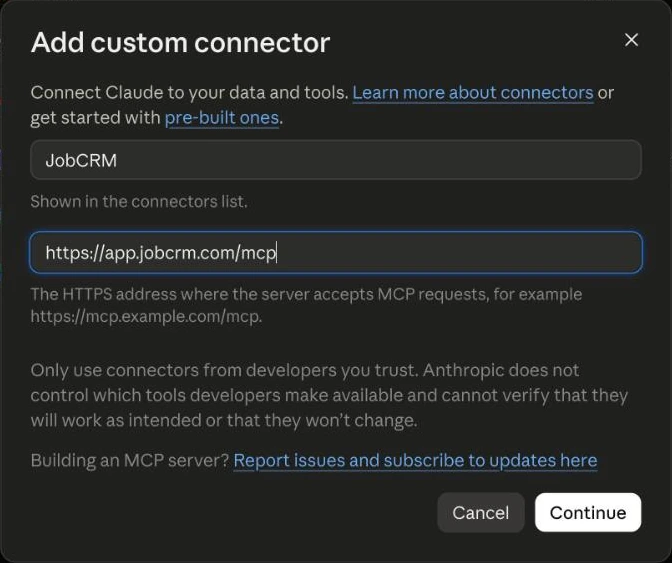
    In Claude, open Customize, then Connectors. Click + Add, then Add custom connector. Name it JobCRM, paste https://app.jobcrm.com/mcp as the server URL and click Continue.

    Claude's Add custom connector window with the name JobCRM and the URL https://app.jobcrm.com/mcp
  2. Keep sign-in turned on

    On the next screen, make sure a sign-in option is selected, not No sign-in, and leave the OAuth client on the recommended choice. Click Add.

  3. Let Claude look things up without asking (optional)

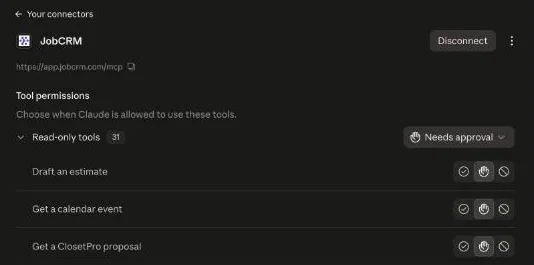
    Open the JobCRM connector’s page and set Read-only tools to Always allow, so Claude doesn’t stop to ask before each lookup. Tools that make changes still ask you first.

    The JobCRM connector page in Claude, with the permission setting for its read-only tools
  4. Ask for a dashboard

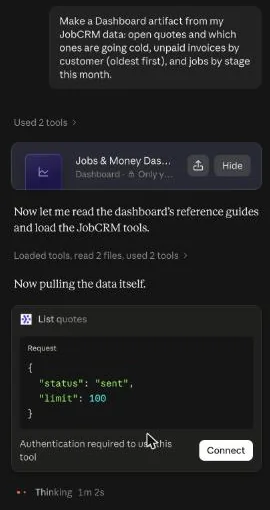
    Start a new chat with JobCRM turned on and ask for what you want to see. For example: “Make a Dashboard artifact from my JobCRM data: open quotes and which ones are going cold, unpaid invoices by customer (oldest first), and jobs by stage this month.”

  5. Sign in when Claude asks

    The first time Claude needs your data, it shows Authentication required with a Connect button. Sign in with the email you use for ClosetCRM (we email you a 6-digit code, or use your password), pick your workspace and approve. No account yet? Start a free trial from the same window.

    A Claude chat asking for a JobCRM dashboard, with Authentication required and a Connect button
  6. Use your dashboard

    Claude builds the dashboard next to the chat. Press refresh to pull the latest numbers, or ask Claude to add or change a chart. It starts private to you; anyone you share it with signs in to ClosetCRM with their own account.

What you get

Here is the dashboard Claude built from that one request. These screenshots are from our own test account.

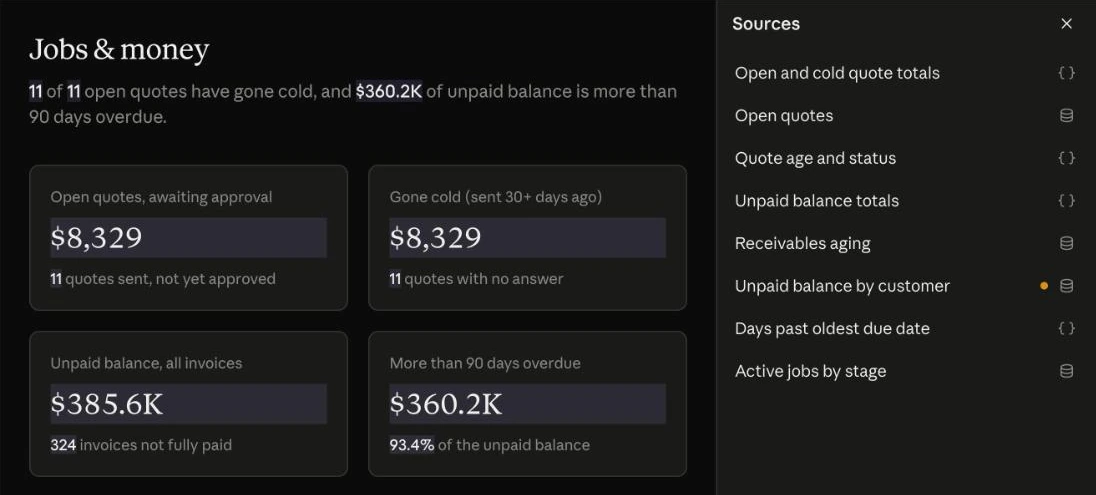
Headline numbers and the Sources panel in a Claude dashboard
Headline numbers: open quotes, quotes gone cold, the unpaid balance and how much is more than 90 days overdue. The Sources panel lists the query behind each number.
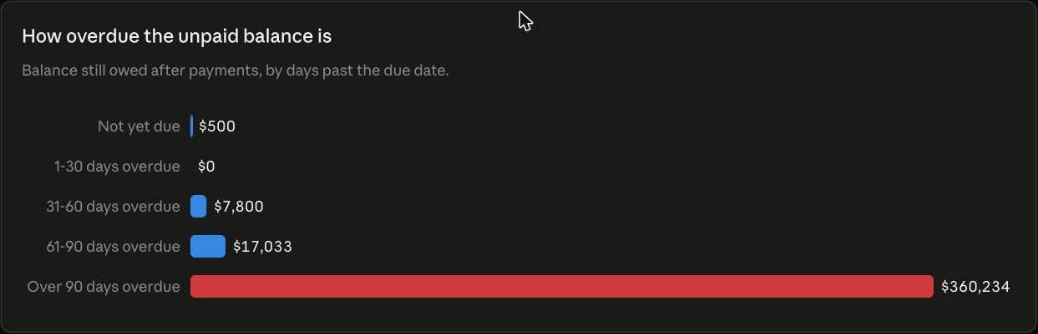
A bar chart of unpaid balances by age
Unpaid balance by age, from not yet due to over 90 days overdue. Below it, a searchable list of who owes what, oldest first.
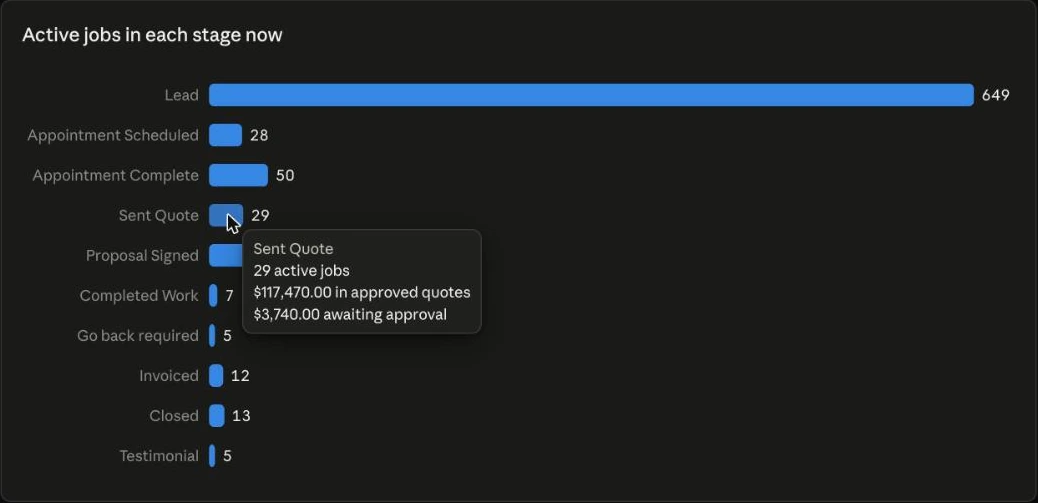
A bar chart of active jobs in each stage, with a hover tooltip
Jobs in each stage. Hover a bar for the job count and the quote totals behind it.

More to ask for

Ask in the same chat to add a chart, or start a new dashboard.

Who owes me“Show unpaid invoices by customer, oldest first.”
Quotes going cold“Which quotes have we sent that haven’t been approved, and which ones are going cold?”
Jobs by stage“Chart our jobs by stage this month.”
Revenue“Add a chart of revenue by month this year.”
Unbilled work“What did we finish or get approved that we haven’t invoiced yet?”

At a glance

What it isClaude Dashboards, a beta feature in Claude, built from your live ClosetCRM data through the JobCRM connector
Claude planA paid plan: Pro, Max, Team or Enterprise. On Team and Enterprise an admin may need to turn it on under Organization settings, then Artifacts
Connector URLhttps://app.jobcrm.com/mcp
Your ClosetCRM accountSign in with the email you use for ClosetCRM. Claude reaches only the workspace you approve, and only what your role allows
Ready-made reportsRevenue by month, unpaid invoices by age, jobs by stage, quotes by status with your win rate, and unbilled work
Staying currentThe refresh button pulls your latest data
SharingStarts private. Each person you share it with signs in to ClosetCRM with their own account

Questions

Do I need a paid Claude plan?

Yes. Dashboards are a beta feature on paid Claude plans: Pro, Max, Team and Enterprise. On Team and Enterprise, an admin may need to turn them on under Organization settings, then Artifacts.

Why does Claude show JobCRM instead of ClosetCRM?

The connector is named JobCRM in Claude, and it works with your ClosetCRM account. Sign in with the email you use for ClosetCRM and pick your workspace.

Does the dashboard keep up with my ClosetCRM data?

Yes. It reads your live ClosetCRM data each time, and the refresh button on the dashboard pulls the latest numbers.

Can I share a dashboard with my team?

Yes. A dashboard starts private to you. When you share it, each person who opens it signs in to ClosetCRM with their own account.

Will Claude change anything without asking?

Lookups only read your data, so you can let them run without asking. Tools that make changes, like emailing a quote to a client, still ask you first, and the connector can never move money.

I don’t have a ClosetCRM account yet. Can I still try it?

Yes. When Claude asks you to connect, you can start a free trial from the sign-in window. 14 days free, no card.